Modular Templates: Design Once, Scale Forever
Build video ad timelines from cells, not individual assets. Your template defines structure; your assets and creative compatibility define which combinations go live. One template powers thousands of valid ads.
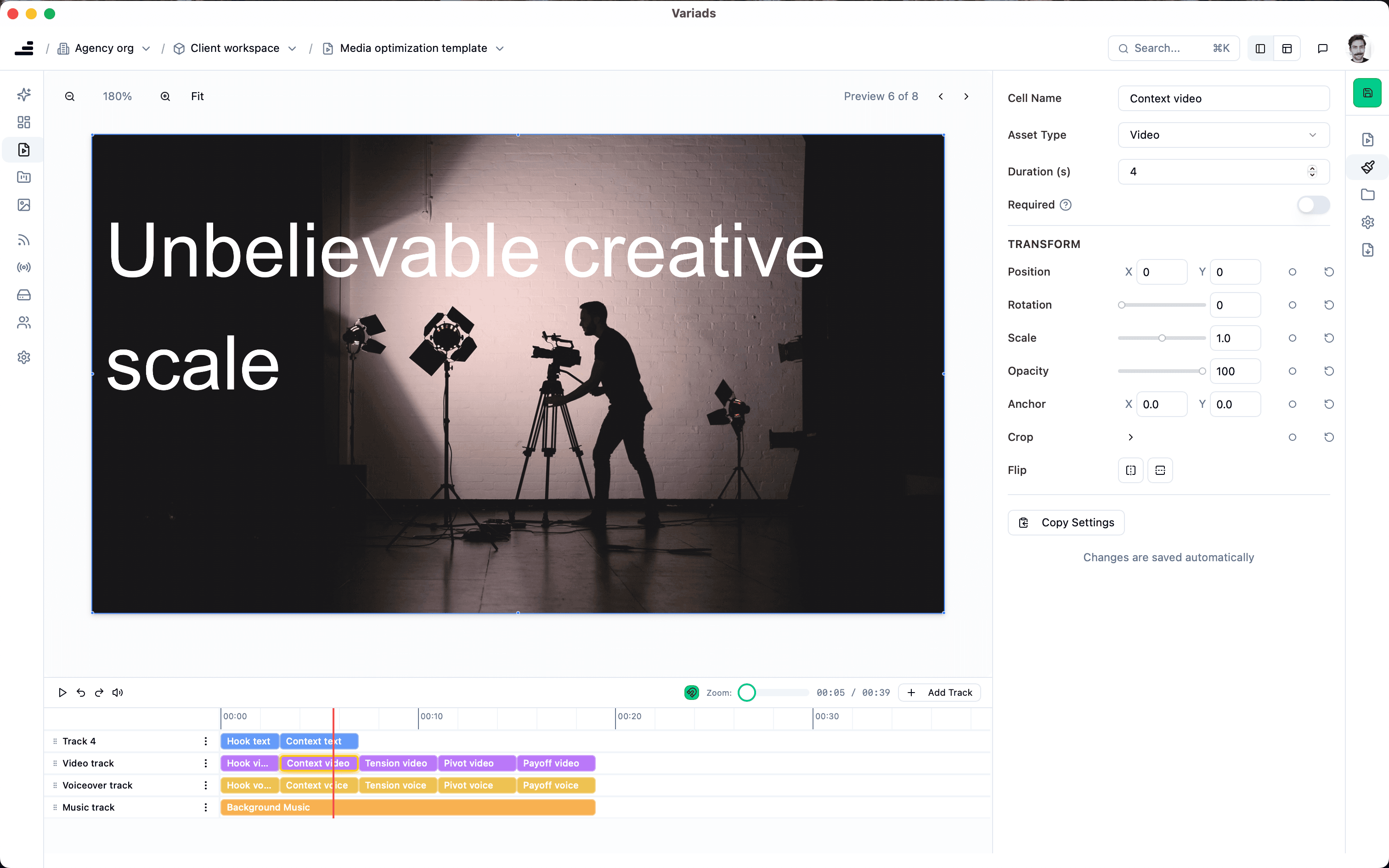
Modular templates are timelines built from cells (placeholders for asset types) like video, voiceover, music, text, or image. You define the structure (hook, value prop, product shot, CTA, etc.) and which types can go where. Individual assets are assigned later. One template can drive thousands of valid ad combinations when paired with compatibility rules and exported via the creative feed.
Why design with cells instead of whole ads
Most video ad workflows treat the ad as the unit of work. You cut a 15-second spot. Then another. Then another for a different audience or platform. Every variant is a new timeline, a new export, a new file. That approach does not scale. Creative teams end up maintaining dozens or hundreds of nearly identical timelines (same structure, different clips or copy), and the slightest change to the structure means updating every single one.
Modular templates flip that. The unit of work is the structure: a timeline divided into named cells (e.g. Hook, Value Prop, Product, CTA). Each cell accepts a type (video, image, text, voiceover, music) and can be required or optional. You design that structure once, for a given channel, format, and length. Then you fill the cells with assets. The same template can hold many different hook videos, many product shots, many end cards. The template stays fixed; the combinations explode. That is the benefit of designing with cells: one timeline definition, many valid ads.
Cells, not assets
Templates deal in asset types and slots: e.g. “Hook (video or image)”, “Product (video)”. You tailor the timeline to channel, format, and placement. Segment it into cells that match how you think about ad structure. Assets are assigned later to feeds; creative compatibility then controls which assets can appear together in the same ad.
Built for the job
Each template is built for a specific use: Meta feed, TikTok, YouTube, or a given aspect ratio and length. You design once for that context; Variads handles the combinations that fit your rules. Export the resulting variants through the creative feed to your ad platforms.
How the template video editor works
In Variads, the template editor is a timeline-based video editor built around cells. You create a template for a specific output: e.g. a 15-second Meta feed ad, 9:16, or a 30-second YouTube skippable. You add cells to the timeline and name them (Hook, Value Prop, Product, CTA) and assign each cell an asset type (video, image, text, etc.). You can mark cells as required (every ad must have something in that slot) or optional (the slot can be empty in some variants).
The editor lets you see the structure at a glance. You are not placing specific clips yet; you are defining where clips can go. Once the template is set, you attach it to a feed and assign assets to the cells. Those assets are then governed by creative compatibility: you define which assets can appear together, and the system generates every valid combination. The template is the blueprint; the feed and compatibility rules determine which blueprints get built.
How templates work with creative compatibility and the creative feed
Modular templates, creative compatibility, and the creative feed form a single pipeline. The template defines the structure: which cells exist, in what order, for which format. The asset library and compatibility rules define which assets can sit in those cells together. The system then generates every valid combination: every way to fill the template such that required cells are filled and every pair of assets in the ad is compatible.
- Template: You design the timeline with cells (Hook, Value Prop, Product, CTA, etc.) and set types and required/optional.
- Assets & compatibility: You add assets to the feed and define which can appear together. See creative compatibility for how that works.
- Valid combinations: The system produces every ad that fits the template and satisfies the compatibility rules. No broken or off-brand mixes.
- Creative feed: You export that set as a feed (e.g. XML) for Meta, TikTok, Smartly, Channable, or other platforms. The creative feed is where scaled output meets your ad stack.
So: the template is the structure; compatibility is the guardrail; the feed is the delivery. All three work together so you get scale without losing control.
Benefits of modular templates for creative teams
- One timeline, many variants. Change the structure in one place; every combination that uses that template reflects it. No copying timelines for each variant.
- Channel- and format-specific design. Build a template for Meta feed, another for TikTok, another for YouTube. Each is optimized for that context; assets and compatibility can be shared or kept separate.
- Clear handoff. Creatives own the template and the asset library; compatibility and feed configuration can sit with media or ops. The template is the single source of truth for structure.
- Faster iteration. Add a new cell or adjust the order once; the system regenerates valid combinations. New assets get mapped for compatibility and flow into the creative feed without rebuilding the template.
One template, many variants
A single modular template becomes the engine for scaled creative. You add assets and compatibility rules; the system generates every valid ad that fits the template. No rebuilding for each new asset: the template stays, the output scales. Export the results through the creative feed to your ad platforms and keep control over what goes live.
That is the promise of modular templates: design once for structure, fill with assets and rules, and let the system produce only the combinations you allow, at the volume you need.
The bottom line
Modular templates are the structural layer of Variads: timelines built from cells, not from individual assets. They give you one place to define how an ad is built: then creative compatibility defines which building blocks can go together, and the creative feed delivers the result to your ad stack.
For creative teams producing video advertising, that means less repetitive timeline work and more focus on concepting, producing great building blocks, and setting the rules. The template editor is where you design the system; the rest of the platform scales the output.